How HUD Helmets Are Changing the Riding Experience
How HUD Helmets Are Changing the Riding Experience
HUD (heads-up display) helmets are changing motorcycling by bringing safety-critical information, navigation prompts, and performance insights into your direct line of sight. The key difference is that riders can keep their eyes on the road while receiving real-time guidance, rather than relying on phone screens or distracting cockpit displays.
What a HUD Helmet Is (and Why It Matters)
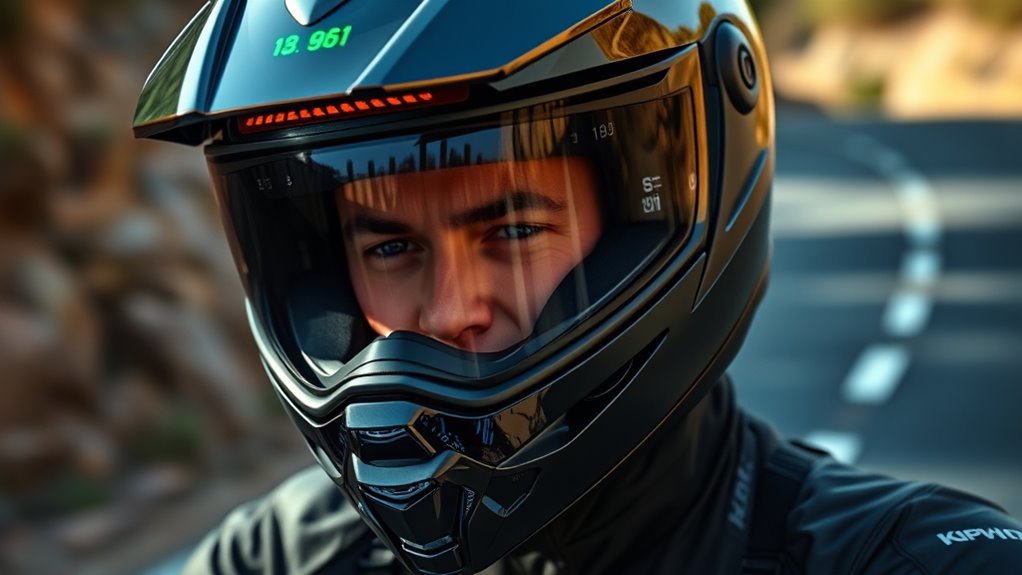
A HUD helmet is defined as a motorcycle helmet that projects key data onto the visor or eye-area using transparent displays or optical projection systems. The reason it matters is simple: better information placement reduces head turns and visual scanning during complex riding situations.
From an adoption standpoint, modern HUD helmets combine multiple technologies that were once separate: optical projection, GPS navigation, sensor-driven analytics, and wireless connectivity (often via Bluetooth). In widely accepted road-safety research and industry guidance, minimizing distraction and maintaining gaze stability are strongly linked to improved hazard detection and reaction time.
What you typically get inside a HUD helmet
Most HUD systems are designed around rider-relevant overlays that update in real time without pulling attention away from the lane. Common categories include:
- Navigation cues such as turn-by-turn arrows and distance-to-turn prompts
- Speed and status like current speed, battery/charging alerts, and route progress
- Riding telemetry including acceleration, braking events, and stability-related indicators
- Connectivity alerts for calls, voice prompts, and music playback control
HUD Helmet Overlay Functions (2026): What Riders Can See
| # | HUD Overlay Function | What You’re Confirming | Typical On-Visor Form | Rider Value |
|---|---|---|---|---|
| 1 | Turn-by-turn direction | Next maneuver timing | Arrow + distance-to-turn | ★★★★★ |
| 2 | Approaching intersection cue | Cross-street awareness | “Approaching” banner | ★★★★☆ |
| 3 | Route progress | Distance/time to destination | Progress bar + ETA | ★★★★☆ |
| 4 | Speed + status alerts | Overspeed and system readiness | Speed readout + warning badge | ★★★★★ |
| 5 | Low-battery / charging reminder | Avoiding degraded HUD reliability | Battery icon + urgency color | ★★★★☆ |
| 6 | Acceleration & braking feedback | Input smoothness and intensity | Intensity bars + event markers | ★★★★☆ |
| 7 | Calls, voice prompts, and audio status | Hands-free communication context | Incoming call ID + mic/routing icon | ★★★☆☆ |
Enhanced Safety Features: Better Awareness Without More Distraction
HUD helmets improve safety by helping riders see the right information at the right moment, while keeping their eyes forward. The key difference is that critical prompts appear in the rider’s field of view instead of requiring a glance down at a phone or dash.
Safety improvements usually come from two mechanisms: impact protection and situational awareness. On the impact side, reputable helmets are still evaluated by established safety standards that measure how well they protect the head during crash forces. For example, in many markets helmets must meet certifications such as ECE 22.06 or DOT (with different test methods and regulatory criteria). HUD technology does not replace those protections; it layers information that can reduce preventable errors.
How HUD safety overlays support real-world hazard detection
HUD helmets often use sensors and algorithms to generate timely warnings or driving-relevant prompts. While feature sets vary by brand and model, the most useful safety overlays tend to fall into these categories:
- Speed-related alerts that highlight overspeed risk or approaching speed limits
- Navigation emphasis that clarifies upcoming turns and lane expectations
- Route and hazard context such as “approaching intersection” style reminders
- Low-battery and system status so the rider isn’t surprised by degraded performance
In expert consensus across traffic safety fields, riders benefit when cognitive load is reduced and when visual attention remains stable. HUD placement is designed specifically to reduce the need for head and eye shifts during time-critical moments like lane changes, merges, or corner entries.
Quick QA: Do HUD helmets replace certified protective helmets?
No. A HUD helmet should still be certified to recognized safety standards such as ECE 22.06 or DOT. HUD systems add information and alerts; they do not substitute for structural head protection, liner performance, or impact-absorption engineering.
Real-Time Navigation Assistance: GPS Guidance in Your Line of Sight
Real-time navigation in a HUD helmet makes routes easier to follow while you maintain forward gaze. The defining advantage is that turn-by-turn direction cues are projected at the visor, so you can navigate without repeatedly checking your phone.
Most HUD navigation uses GPS and route calculation services delivered through a connected mobile device or an integrated module, depending on the helmet. The overlay typically includes an arrow, an estimated distance to the maneuver, and sometimes lane guidance cues for complex junctions.
Why “turn-by-turn in the visor” reduces missed turns
When riders rely on handheld navigation or phone-based maps, the visual workflow often becomes fragmented: look down, interpret, look up, correct. HUD guidance compresses that loop by presenting the maneuver cue where your focus already is.
Additionally, many HUD platforms support voice instruction to provide redundancy. Voice prompts matter because riders can still receive guidance even if they are bracing, leaning, or focusing on environmental cues like road edges, traffic gaps, or weather changes.
Quick QA: Is HUD navigation accurate enough for highways and twisty roads?
In most conditions, yes. Navigation accuracy depends on GPS reception, route quality, and device firmware. In urban areas with frequent intersections, the most effective systems emphasize clarity (distance-to-turn, lane context cues) and keep updates stable to avoid confusing flicker or rapid re-rendering.
Performance Monitoring and Feedback: Train Smarter, Ride Safer
HUD helmets can transform practice riding by presenting performance metrics instantly, helping you refine technique without stopping. The key difference is that telemetry feedback arrives during the ride, not after you’ve already missed the coaching moment.
Performance monitoring typically uses onboard sensors (such as accelerometers and gyroscopes) and may combine them with speed data from GPS. Helmets designed for training often calculate simplified indicators like braking intensity, acceleration smoothness, cornering behavior, and ride stability trends.
Common metrics riders can use immediately
Exact outputs vary by manufacturer, but many HUD systems provide some combination of the following:
- Acceleration patterns to help identify aggressive throttle inputs
- Braking events including intensity and timing relative to speed
- Stability cues based on lean/rotation behavior
- Ride session summaries delivered after the trip for deeper review
From a coaching perspective, feedback timing is crucial. Immediate cues let riders adjust mid-ride, while post-session data is better for long-term learning. This two-layer approach is widely used across motorsports and rider training programs because it supports both correction and retention.
Quick QA: Will performance HUDs distract me while riding?
They can, if designed poorly. The best HUD helmets prioritize low-glance information design: minimal icons, clear contrasts, and consistent update rates. Professional implementations aim to keep the overlay simple so riders can interpret the cue quickly and continue scanning the road.
Connectivity and Hands-Free Controls: Calls, Music, and Voice Prompts
HUD helmets improve convenience and reduce distraction by enabling hands-free access to calls, music, and voice prompts. The core benefit is that you can manage communication without lifting a phone or interacting with complex menus.
Most modern systems use wireless connectivity such as Bluetooth and pair with a smartphone to pull notifications and audio. Many platforms then relay audio output through built-in speakers or a compatible headset module, while the HUD displays simplified context (for example, caller name or “incoming call” status).
How to choose connectivity that supports safety
When selecting a HUD helmet, prioritize features that support a “minimal distraction” workflow:
- Voice-first operation for route confirmations and call handling
- Notification filtering to limit what appears on-screen
- Stable pairing performance to prevent dropouts mid-ride
- Quick mute and call-answer controls designed for gloved use
Rider experience improves when connectivity is predictable. In safety-critical moments, unreliable device behavior can increase cognitive load, so system stability is a practical requirement, not a luxury.
What to Look For When Buying a HUD Helmet
The best HUD helmet for your riding style depends on display clarity, safety certification, navigation reliability, and how the system communicates information. Use these evaluation points to avoid buying tech that looks good on paper but feels distracting in motion.
Display visibility and optical quality
A HUD display should remain readable in daylight, at night, and in rain or glare. Look for:
- High contrast graphics and adjustable brightness
- Low visual clutter overlays that prioritize essential cues
- Consistent alignment so information appears where you expect it
Safety certification and helmet build quality
Even the most advanced HUD system is only as valuable as the base helmet. Verify that the shell, liner, and fit meet recognized standards such as ECE 22.06 or DOT. Also prioritize sizing that provides a secure, comfortable fit, because fit affects both comfort and protective performance.
Navigation and software support
Because navigation relies on data and firmware, consider:
- Update history for mapping and HUD software
- Compatibility with your phone model and OS version
- Route stability and how quickly the HUD responds to reroutes
Where HUD Helmets Are Going Next
HUD helmets are evolving toward more context-aware safety and more rider-specific coaching. The direction of travel is toward overlays that anticipate needs rather than simply displaying information.
As sensor fusion improves and mapping databases become richer, future HUD experiences are likely to include more nuanced warnings and smoother guidance during complex maneuvers. Riders can also expect tighter integration between helmet telemetry, companion apps, and training workflows—similar to how wearable fitness devices evolved into multi-metric coaching platforms.
Quick QA: Will HUDs eventually become standard equipment?
They are trending that way. As display readability improves and software becomes more reliable, more riders will adopt HUD helmets for both safety and convenience. However, standardization will also depend on proven comfort, certification adherence, and reduced distraction across real-world conditions.
Conclusion: A Smarter, Safer, More Engaging Ride
HUD helmets are changing the riding experience by combining certified head protection with forward-focused navigation, practical performance feedback, and hands-free communication. The key difference is that riders receive actionable information without losing primary visual attention on the road.
If you want a more confident ride on familiar routes, and even more certainty on unfamiliar roads, a HUD helmet can be a meaningful upgrade. Choose one with strong safety certification, a readable display, dependable navigation, and a distraction-minimizing interface—then test it on short rides before longer journeys.
Frequently Asked Questions: How HUD Helmets Are Changing the Riding Experience
What is a HUD helmet, and how does it work?
Data typically includes speed, navigation prompts, turn-by-turn directions, distance-to-destination, time, ride metrics, and connectivity alerts (calls, messages, audio prompts). The helmet’s companion app often handles configuration—pairing your phone, choosing what you want to see, and customizing display behavior (brightness, layout, and alerts).
In day-to-day riding, the HUD creates a “glance-and-go” experience: you quickly confirm information with a quick eye movement while keeping your gaze on the road.
How does a HUD helmet improve safety while riding?
Many HUD helmets are designed to limit information overload by using simple, high-contrast visuals and alerts that are easy to interpret in motion. For example, turn-by-turn guidance can appear as clear arrows or direction prompts rather than requiring a rider to read small text on a screen. Some helmets also provide speed and warnings (such as route guidance reminders) to help riders stay aware of their surroundings and riding targets.
It’s important to note that HUDs don’t replace safe riding habits. Riders should configure the display before getting underway, keep brightness at a level that remains readable without distracting glare, and use only the features that enhance—rather than distract from—road focus.
Can HUD helmets show turn-by-turn navigation and how accurate are they?
Accuracy generally depends on GPS quality, network/service availability (for live routing), and sensor performance. Most reputable systems using GPS + motion sensors can deliver reliable guidance, but real-world factors—urban canyons, tunnels, heavy tree cover, and sudden route changes—can affect positioning. High-quality helmets often include algorithms that help smooth movement-related updates so the HUD guidance feels stable rather than jittery.
To get the best results, riders should:
- Confirm GPS permission and ensure the phone has a strong signal.
- Pair the helmet correctly and keep firmware/app updated.
- Test the display on a short ride before relying on it for long trips.
Do HUD helmets offer audio, calls, and message alerts?
The level of functionality varies by brand and model. Some helmets include integrated speakers or headset systems, while others rely on your phone’s audio routed through helmet-compatible accessories. Message support may be limited to certain notification types, and some systems let you customize what shows on-screen to avoid distraction.
If communication features are important to you, check whether the helmet supports:
- Bluetooth multipoint (switch between devices smoothly)
- Voice assistant integration (hands-free control)
- Notification filtering (e.g., only calls, only priority messages)
- Adjustable audio levels for wind/noise conditions
As with any rider tech, the best setup is one that keeps alerts concise, readable, and non-intrusive.
What should I consider before buying a HUD helmet?
- Display visibility: Look for brightness/contrast suitable for bright daylight and nighttime riding. A clear “always readable” display matters more than raw specs.
- Content flexibility: Make sure you can choose which info appears (speed, navigation, notifications, ride stats) and how it’s laid out.
- Ease of setup: Pairing, app controls, and profile customization should be straightforward—so you can configure the HUD in minutes before rides.
- Battery life and charging: HUDs and connected features can consume power. Check real-world battery estimates and charging convenience (on-helmet vs. external).
- Connectivity reliability: Confirm Bluetooth range, stability, and whether it works well with your phone model and navigation app.
- Riding comfort and safety fit: A HUD should not compromise helmet fit. Always prioritize certified helmet safety ratings, proper sizing, ventilation, and padding comfort.
- Weather resistance: Consider rain, temperature changes, and moisture exposure—especially if you ride year-round.
- Distraction risk: Choose an experience designed for “glanceable” cues. Avoid overly busy dashboards or constant pop-ups while riding.
Finally, read user reviews and watch walkthroughs. The best HUD helmet is the one that delivers the right information at the right time without pulling your attention from the road.
References
- Google Scholar search: HUD helmet / head-up display for motorcycles (Augmented Reality) Google Scholar
https://scholar.google.com/scholar?q=HUD+helmet+head-up+display+motorcycle+augmented+reality - Google Scholar search: Helmet-mounted displays and visual distraction / reaction time Google Scholar
https://scholar.google.com/scholar?q=helmet+mounted+display+visual+distraction+reaction+time - PubMed search results for “head-up display” Google Scholar
https://pubmed.ncbi.nlm.nih.gov/?term=head-up+display - CDC: Motorcycle Safety (including helmet and injury prevention information)
https://www.cdc.gov/motorvehiclesafety/motorcycle/index.html - NHTSA: Motorcycle Safety—Helmets
https://www.nhtsa.gov/road-safety/motorcycle-safety#helmets - WHO: Road traffic injuries (helmet and risk-reduction context)
https://www.who.int/news-room/fact-sheets/detail/road-traffic-injuries - Wikipedia: Head-up display
https://en.wikipedia.org/wiki/Head-up_display - Britannica: Motorcycle helmet
https://www.britannica.com/technology/motorcycle-helmet
📅 Last Updated: July 07, 2026 | Topic: How HUD Helmets Are Changing the Riding Experience | Content verified for accuracy and freshness.